
App Development

Offline Mobile App Sync: Define Conflict Rules Before Development

Plan offline mobile sync around versions, ownership and field-level conflict rules. Handle queued edits, deletions and access changes before development.

Offline Mobile App Sync: Define Conflict Rules Before Development

Published:

Share

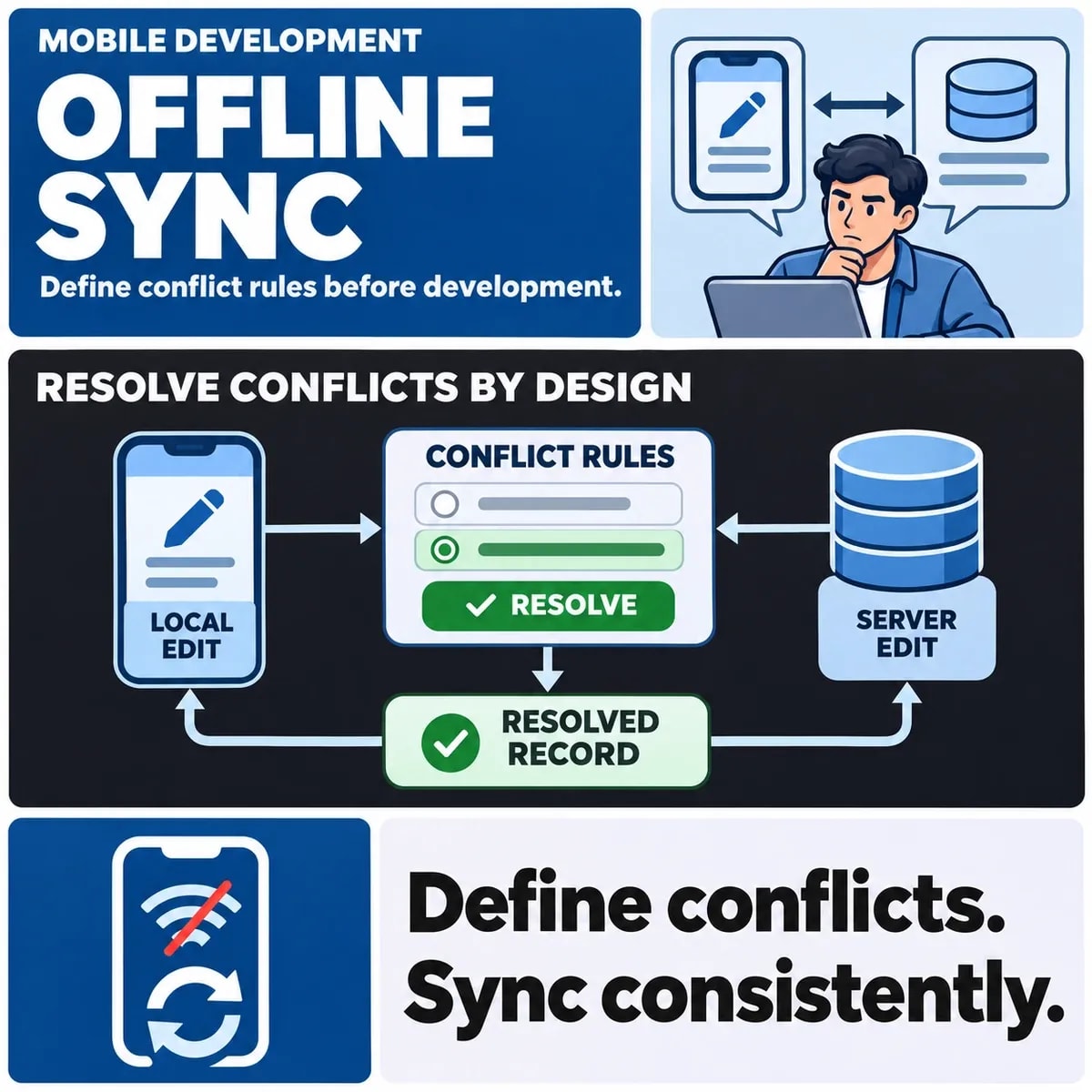
Offline mobile sync needs agreed conflict rules before development begins. Specify what a user can read or change without a connection, how queued work is identified and what happens when the server has changed in the meantime. A single “last update wins” rule may lose information or apply the wrong business action.

Define decisions by field and operation. Appending a note, replacing a quantity and deleting a record have different consequences. The app should make pending, accepted and rejected work understandable to the user.

List what users may read and change offline

Start with the situations that require offline use. A fictional field-service worker might need a visit summary, a checklist and a way to record work in a building with poor connectivity. Decide which information must be available before the connection is lost.

Use the wider mobile backend architecture to understand where identities, storage and background work fit.

Separate cached reading from offline writing. Being able to view a previously loaded record does not mean the app can safely accept every edit. Some actions may require current server information or a connected approval step.

Android's offline-first architecture guidance discusses local data, synchronisation and conflict resolution. The business rules still depend on the application; a platform pattern does not decide whether one user's change may replace another's.

Define how freshness is communicated. A user should be able to recognise that a schedule or status comes from a previous sync. Avoid a design in which a stale value appears indistinguishable from a newly confirmed server result.

List device and data limits too. Decide how much history is needed, which attachments may be stored and how the app behaves when required data was never downloaded. “Works offline” should describe a bounded set of capabilities rather than an unlimited promise.

Identify records, versions and ownership

Give local records and queued operations identities that remain useful when they reach the server. A newly created offline record may not yet have a server identifier, but the system still needs to recognise the same creation attempt after an interruption.

Define how queued operations are identified and reconciled within the API integration contract.

Record which version or starting state the user edited. A server can then distinguish a change based on current information from one based on an older copy. The engineering team must choose the mechanism; the requirements should explain which business conflicts it needs to expose.

Ownership can differ by field. A worker may own a visit note while dispatch controls the assignment. An offline edit should not gain permission to change the whole record merely because some fields are editable.

Do not assume device clocks establish a reliable business ordering. Define what evidence determines precedence and how uncertain order is treated. The intended outcome should remain explainable when devices reconnect at different times.

Choose rules by field and operation

For notes, preserving both contributions may be appropriate. For a structured status, the business may permit only certain transitions. For quantities, replacing the latest value can erase a separate adjustment that happened while the device was offline.

Work from the operation's meaning. “Add two items” differs from “set the total to two”. If both are represented as a changed number without context, the server may be unable to choose a sensible resolution.

Deletion is a separate policy. Decide whether a stale edit may recreate a deleted record, must be rejected or needs review. A user should receive an understandable result rather than seeing work disappear or an intentionally removed record return.

Where a person must resolve a conflict, give them the relevant versions and consequences. A choice between unexplained “local” and “remote” values can shift an unresolved product decision onto someone who lacks the evidence to make it.

Plan reconnection, duplicates and access changes

Reconnection is a process, not a moment when all work automatically succeeds. Some operations may be accepted, others rejected and others still waiting for a dependency. Keep their states visible and define how related operations are ordered.

A dropped response can leave the device unsure whether the server applied a change. Repeating the same queued operation should encounter the agreed identity and duplicate rules. Creating a fresh operation on every retry can repeat an effect.

Access may change while the device is offline. The server needs to assess the queued operation under the applicable authority when it is processed. Decide what the user sees when a previously permitted edit is no longer authorised.

Also plan the treatment of cached information after sign-out, device handover or access removal. The responsible security and product owners should define the required behaviour. The existence of offline storage does not answer who may continue to read it.

Use the conflict decision table

The following hypothetical cases illustrate different decisions. They are not validated sync behaviour for a released app.

SituationQuestion to agreePossible rule to review
Two workers edit the same noteAre they replacing text or contributing separate observations?Preserve both or use an explicit merge process
An offline quantity meets newer server activityWould replacement erase valid work?Reconcile the operation rather than blindly overwriting
A record is deleted while a device edits itMay the edit recreate it?Reject or route for review under the chosen policy
Access is revoked before reconnectionIs the queued change still authorised?Recheck authority and communicate the rejected result

For the fictional field-service visit, follow a note and a completion action separately. The note might be preserved while completion is held because the assignment changed. That outcome can be legitimate if the user understands it and someone owns the unresolved work.

Acceptance should include repeated sync, partial success, an app restart and a stale record. Check both device and server evidence. A disappearing spinner does not establish that every business operation was accepted.

Walk through a rejected offline operation from the user's perspective. The fictional worker completes a visit while disconnected, but dispatch has reassigned it before reconnection. The server rejects the completion under the agreed rule. Decide whether the worker can still retain a local note, who receives the unresolved case and how the interface distinguishes saved work from accepted completion. A generic sync error gives too little direction.

Do not remove queued evidence merely because the app has displayed a warning. The workflow needs a defined closure action and appropriate retention arrangements. Equally, preserving an operation for review should not cause it to be retried indefinitely after a final rejection.

Agree the sync contract before app development

Bring product, operations and engineering owners together to review the conflict table. Confirm the offline boundary, identities, field rules, access changes and user messages before implementation estimates assume them.

The contract should make difficult cases visible without forcing every conflict into a generic overwrite policy. That gives users a clearer account of their work and the support team a route to resolve the cases automation cannot safely decide.

Discuss offline mobile app requirements with ZakCodeX before sync behaviour becomes an implementation assumption.


Ushba Amir

Ushba Amir

I’m Ushba, a tech-focused writer who turns innovation into relatable content for diverse audiences. I thrive on creating insights that connect businesses with people. Off the page, I’m usually reading, journaling, or curating inspiration for my next project.

More On This Topic

Frequently Asked Questions

Book a Discovery Call

Is last-write-wins suitable for every offline conflict?

Choose rules according to the field and operation. Replacing a note, applying a quantity adjustment and deleting a record have different consequences. A simple replacement rule can lose another user's work. Define when to preserve contributions, reject an operation or involve a reviewer rather than applying one policy everywhere.

What should a user see when only part of their offline work syncs?

Distinguish accepted, pending and rejected operations, with an understandable next step for unresolved work. For example, a note may be retained while completion of a reassigned visit is rejected. A disappearing sync indicator or generic error should not imply that every business action reached the same outcome.

Can queued offline changes still be applied after access is revoked?

The server must assess them under the applicable authority when processed. Specify the intended rejection or review behaviour and how the user learns the result. Separately define treatment of cached information and retained work; the fact that a change was entered offline does not establish continuing permission to apply it.

Does offline reading automatically imply support for offline editing?

No. Define the bounded capabilities separately. Some actions may require current server information or connected approval even when cached records remain readable. The interface should communicate which work can be saved locally and which outcome is not yet confirmed.

Why do offline operations need stable identities?

A device can lose a response after the server applies a change. An enduring operation reference helps the system recognise the same attempt during retry. Creating a fresh identity every time can turn recovery into repeated business effects.

Should an offline edit recreate a record deleted on the server?

Choose that rule explicitly. Recreating, rejecting and routing for review have different business consequences. A stale device should not silently reverse a deliberate deletion merely because its edit arrives later than the server change.

Can a device timestamp decide every sync conflict?

Do not assume it expresses the intended business precedence. Define the evidence and policy for ordering changes, including uncertainty. Note contributions, quantity operations and status transitions can require different decisions even when timestamps are available.

How should the app explain stale cached information?

Make freshness and pending changes understandable so users do not mistake an earlier download for current confirmation. Identify the fallback when required data was never downloaded. A useful offline scope explains both available information and its limits.

From Insight To Action

Create An App People Want To Use

Bring your app idea, your users and the challenge you want to solve. We can help you choose a suitable platform, prioritise the features that matter and plan a clear path from an initial concept to a useful mobile experience.

Book a Consultation
AI-created planning session with two professionals reviewing a workflow at a sunlit studio desk.

Keep Exploring

Related Blogs

All Insights
What is the Best Framework for Mobile App Development

What is the Best Framework for Mobile App Development

Table of Contents: What is a Mobile App Development Framework? · Key Factors to Consider When Choosing a Mobile App Framework · Top Mobile App Development Frameworks in 2026 · 1. React Native · 2. Flutter · 3. Xamarin · 4. Ionic · 5. Swift and Kotlin for Native Apps · Comparing Popular Frameworks · How ZakCodeX Helps You Choose the Right Framework · Tips for Successful Mobile App Development · Trends in Mobile App Development Frameworks · Conclusion

By Sana Khalid
What Is Native Mobile App Development? Complete Guide for Businesses in 2026

What Is Native Mobile App Development?

Table of Contents: What Is Native Mobile App Development? · How Native Mobile App Development Works · 1. Planning and Strategy · 2. UI/UX Design · 3. Development · 4. Testing · 5. Deployment · 6. Maintenance · Native Mobile App Development Technologies · Android Technologies · iOS Technologies · Key Features of Native Mobile Apps · Performance requirements · Platform interaction patterns · Supported device integrations · Security controls and responsibilities · Offline Capability · Native Apps vs Hybrid Apps · Advantages of Native Mobile App Development · 1. A platform-specific performance approach · 2. Platform-specific interaction work · 3. Use of platform security features · 4. A defined operating workload · 5. App Store discovery is a separate task · Disadvantages of Native App Development · Higher Development Cost · Longer Development Time · Maintenance Effort · When Should Businesses Choose Native Mobile App Development? · High Performance Applications · Complex Features · Large Scale Applications · Long-Term Digital Products · Cost of Native Mobile App Development · Key Cost Factors · Scope before requesting an estimate · Best Practices for Native Mobile App Development · Focus on User Experience · Follow Platform Guidelines · Optimize Performance · Prioritize Security · Continuous Testing · Review the platform decision as requirements change · Conclusion

By Hamza Ali
Is React JS Used for Mobile App Development?

Is React JS Used for Mobile App Development?

Table of Contents: What Is React JS? · Is React JS Used for Mobile App Development? · What Is React Native? · How React JS and React Native Work Together · Why Businesses Use React Native for Mobile App Development · 1. Cross Platform Development · 2. Faster Development · 3. Strong Community Support · 4. Cost-Effective Development · 5. High Performance · Popular Apps Built Using React Native · React JS vs Native Mobile Development · When Should You Use React Native for Mobile Apps? · Limitations of React JS for Mobile Development · 1. Some Features Need Native Code · 2. Large Apps May Need Optimization · 3. Dependency on Third Party Libraries · How React JS Knowledge Helps Mobile Developers · React Native vs Other Mobile Frameworks · React Native vs Flutter · Future of React Based Mobile Development · Why Businesses Choose Professional Development Teams · Conclusion

By Sana Khalid
Is Next.js Used for Mobile App Development?

Is Next.js Used for Mobile App Development?

Table of Contents: What is Next.js? · Key Features of Next.js · 1. Server Side Rendering · 2. Static Site Generation · 3. API Routes · 4. Automatic Code Splitting · 5. Built in SEO Optimization · Can Next.js Be Used for Mobile App Development? · Using Next.js With React Native · How This Works · Benefits of This Approach · Building Progressive Web Apps With Next.js · Features of PWAs · Benefits of PWAs · Next.js as a Backend for Mobile Applications · Example Architecture · Benefits of Using Next.js Backend · Next.js vs React Native for Mobile Development · When Should You Use Next.js for Mobile Projects? · 1. Building Mobile Friendly Web Applications · 2. Creating Progressive Web Apps · 3. Building Web Platforms With Mobile Support · 4. API-Driven Mobile Applications · Advantages of Using Next.js in Mobile App Ecosystems · Fast Performance · SEO Friendly · Developer Productivity · Scalable Architecture · Strong React Ecosystem · Limitations of Next.js for Mobile Apps · Not for Native App Development · Limited Access to Device Hardware · App Store Distribution · Real-World Use Cases · Ecommerce Platforms · SaaS Applications · Content Platforms · Startup MVPs · Future of Next.js in Mobile Development · Conclusion

By Hamza Ali