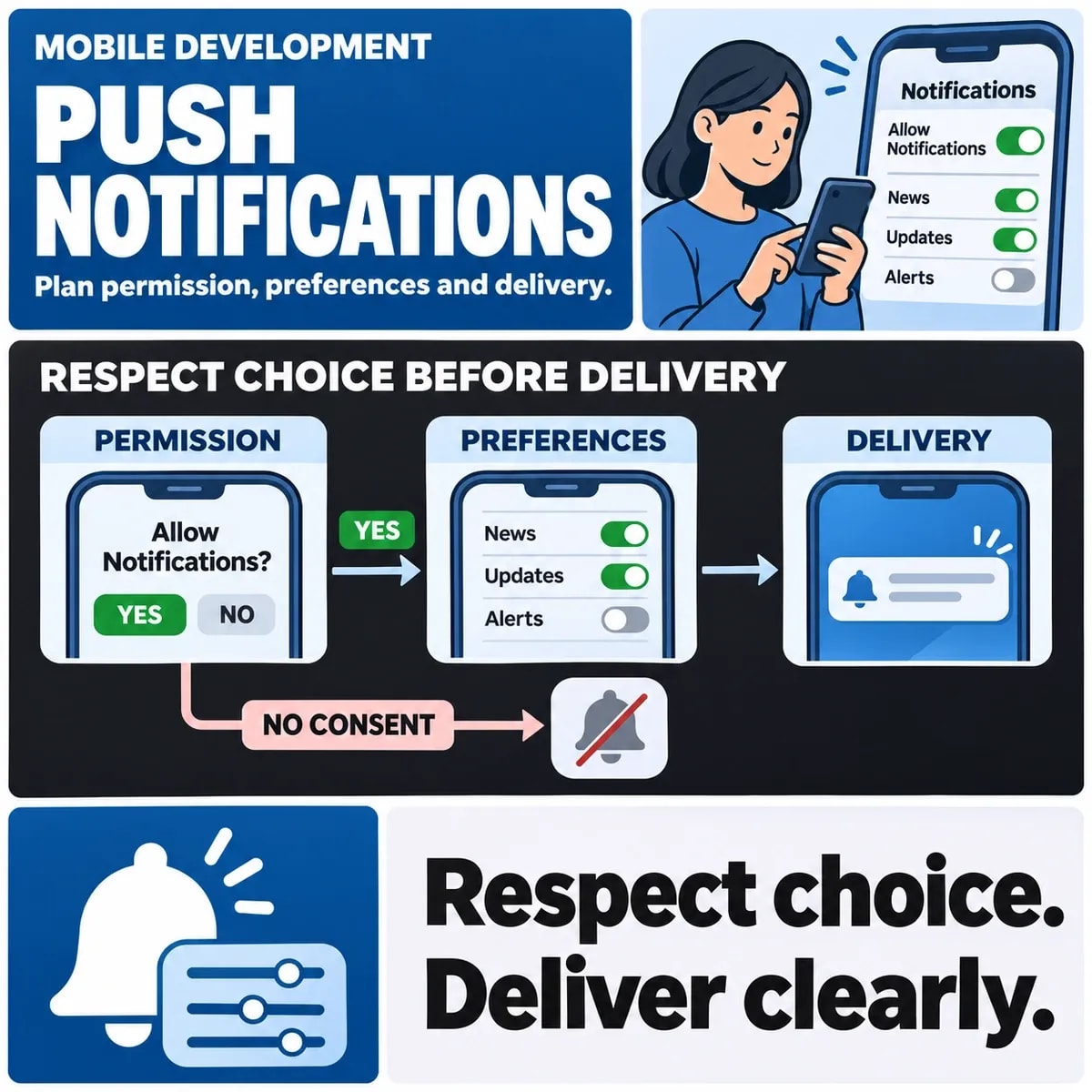

Plan mobile push notifications as three separate decisions: whether the operating system permits them, which messages the account wants and what delivery evidence the service can provide. Permission to notify does not mean every category is wanted, and a service accepting a message does not prove that the user saw it.
These distinctions affect settings, support messages and the journeys available when notifications are denied or unavailable. Agree them before treating push as the only way a user can discover important work.
Separate permission, preference and delivery
OS permission concerns what the app may do on a particular device under the platform's rules. Account preferences concern the categories or situations the user chooses. Delivery concerns what happened to a particular message after it was requested.
Keep these states distinct in the product model. A user can allow notifications at OS level while disabling a category in the app. Another device for the same account can have different OS settings. A single “notifications enabled” flag hides those differences.
Android's notification-permission documentation describes platform-dependent permission behaviour. Apple's authorisation guidance describes requesting notification permission and inspecting settings on its platforms. Implementation should follow the current requirements for the supported OS versions rather than assuming identical behaviour.
OS permission is also not a complete decision about the business purpose of a message. Have the responsible team separately assess the rules applicable to the actual notification categories. Do not present a permission prompt as blanket authority for every communication.
Request OS permission in a meaningful context
Explain the value at the point where the user can understand it. A fictional booking app might explain class-change alerts when a user chooses to receive them. The wording should describe the intended benefit without promising that every alert will arrive or be seen.
Choose the request context and preference controls during mobile app experience design.
Design the states before and after the platform prompt. What can the person do if they decline? Does the app explain where relevant information remains available? Avoid presenting a blocked journey when the feature itself can work without push.
Do not simulate the OS decision with an app-only switch. The product can record an account choice, but it must still inspect and respect the applicable platform state. A setting screen should communicate the difference clearly.
Permission may change outside the app. Plan how the interface reflects that state when the user returns, using the supported platform APIs. Do not keep claiming that notifications are enabled solely because an earlier prompt was accepted.
Define categories and account preferences
Group notifications by user purpose. A booking change, a reminder and a promotional message may need different product decisions. Choose categories that users can understand and that the system can consistently apply.
Record where preferences live and which devices they affect. An account-level category choice and a device-specific OS setting should not overwrite each other. Decide how signed-out users and people without a completed account are handled.
Specify what happens after an account switch on a shared device. The app needs a dependable association between the current account and its notification route. Otherwise a new user may inherit the previous person's preferences or receive a message intended for them.
Also decide what appears on a lock screen or shared device. A generic prompt to open the app may be more appropriate than a detailed record preview for some messages. The correct choice depends on the information and the organisation's policy, so involve the relevant owner.
Plan denied, disabled and unavailable states
Give users a useful in-app route to the underlying information. If a booking changes, the current booking record should not depend on the user having read a push notification. Push is a prompt to inspect state, not the only copy of that state.
Handle missing or expired delivery routes. Decide when a route is updated or removed, what the service's responses mean and who investigates repeated failures. Do not interpret a message accepted for sending as proof of display.
Distinguish message lifecycle evidence where the platform supports it: requested, accepted, available delivery feedback and user interaction. Name unavailable evidence honestly. An analytics label called “sent” needs a documented meaning before support uses it to tell a customer what happened.
A delayed notification can point to a changed or cancelled record. When opened, the app should inspect current state and access rather than blindly displaying the old message as the latest truth.
Choose a policy for repeated messages about the same business change. A corrected booking time may supersede an earlier reminder; several independent tasks may each deserve their own entry. Identify the underlying event so delivery retries and genuine new events are distinguishable. The user-facing choice should follow the business meaning rather than whichever messages happen to arrive first.
Support also needs a way to answer “why did I receive this?” Record the category and triggering event with appropriate access. That can explain a preference mapping error without assuming the device displayed or the user read the message.
Use the permission and evidence matrix
The following illustrative matrix is a requirements aid, not a report of messages sent or devices tested.
| Observed state | Product decision | Evidence limit |
|---|---|---|
| OS permits notifications; category disabled | Respect the category preference | OS permission does not override the account choice |
| OS permission denied | Provide the appropriate in-app route and clear settings information | Permission state does not describe a message result |
| Service accepts a message | Record the supported lifecycle evidence | Acceptance does not prove display or user action |
| Account changes on the device | Apply the agreed account and device association | Old preferences must not silently become the new user's choices |
Add acceptance cases for a settings change outside the app, an expired message destination and a device with no valid route. Check what the user sees and what the operational record can actually establish.
Use fictional accounts and approved test environments. The aim is to inspect product decisions without sending uncontrolled messages to real users. Keep any observed delivery limitations beside the result.
Rehearse a shared-device case with two fictional accounts. The first user enables booking alerts and then signs out. The second user signs in with that category disabled. Ask which account the next notification targets, what appears on the device and whether opening it rechecks access. This case can expose an association problem that a successful permission prompt never exercises.
Record which system makes the final category decision when a message is created. If the device and server hold copies of preferences, define how changes propagate and what happens during a delay. Otherwise each component may appear correct in isolation while the combined journey uses an outdated choice.
Connect notification decisions to the mobile journey
For every category, define the destination after opening the message, the current-state check and the fallback when the destination is unavailable. The notification is one entry point into a larger workflow.
Review notification entry points alongside the wider mobile UX checks for navigation and accessibility.
Bring a category list, preference model and evidence matrix into development planning. They help the delivery team estimate a usable notification feature rather than only the ability to submit a message to a provider.
Discuss mobile notification requirements with ZakCodeX as part of the wider app journey.