
Software Development

CMS Content Approval Workflows: Separate Editing from Publishing

Define CMS editing, review, approval and publishing permissions. Plan content-version changes, revisions and exceptions with a practical workflow example.

CMS Content Approval Workflows: Separate Editing from Publishing

Published:

Share

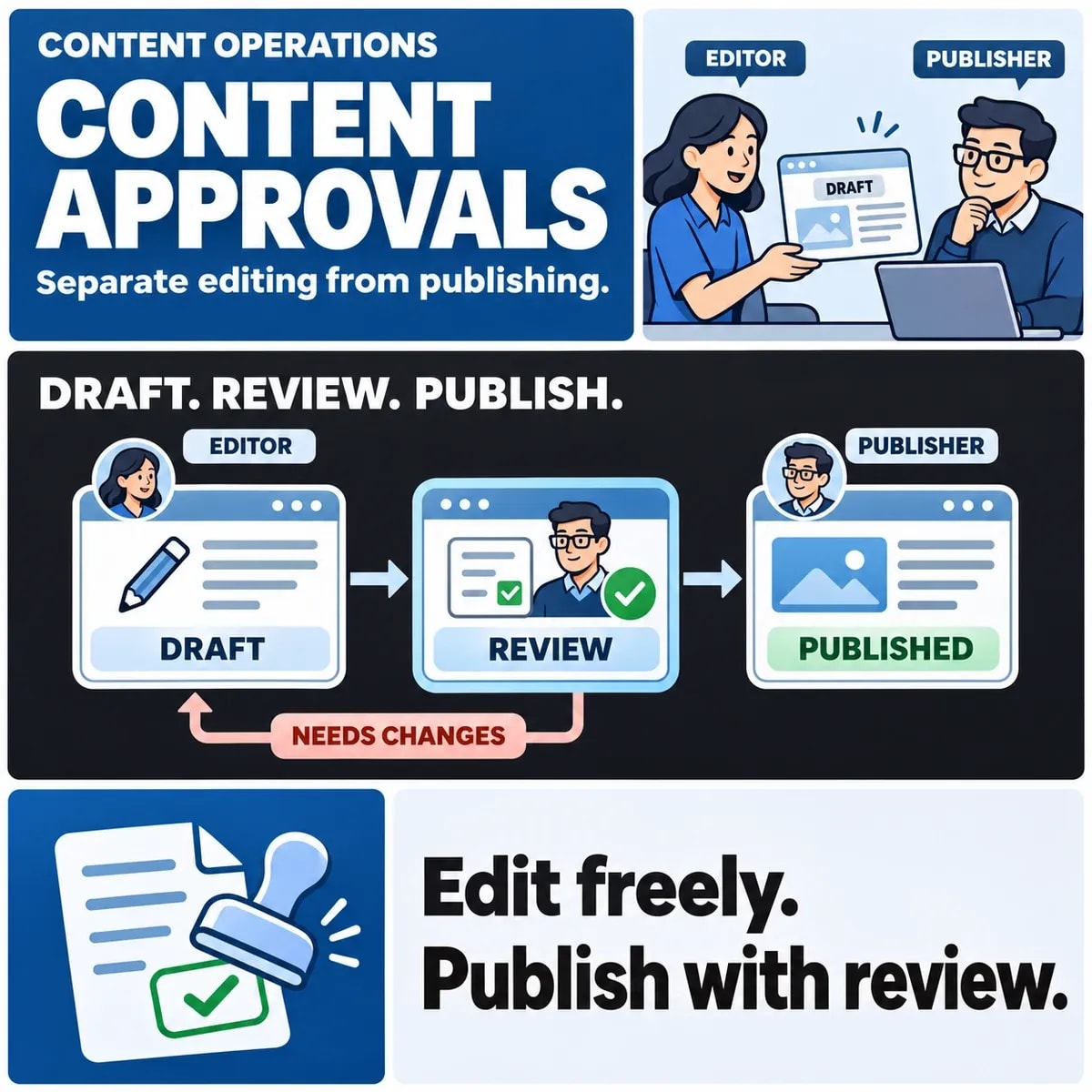
A CMS approval workflow should separate permission to edit from permission to approve and publish. Bind review decisions to a specific content version, define what invalidates approval and make urgent exceptions visible. A status label alone cannot tell the publisher whether the text being released is the text that was reviewed.

Start with the organisation's publishing decisions, then assess how the CMS can support them. This avoids designing a process around a convenient button while leaving ownership, revised content and publication authority unresolved.

List the publishing decisions and their owners

Identify who writes, checks facts, approves the message and releases it. Some teams combine these responsibilities, while others need distinct reviewers for particular content. Record the arrangement the business actually needs rather than assuming that every page follows the same route.

A product description, an announcement and a policy page may need different evidence and owners. Explain which content classes require additional review and how the author knows which path applies.

Optimizely's approval-sequence documentation illustrates staged review decisions in a CMS. It is an example of a supported workflow, not evidence that another platform or installation has the same capability.

Separate review from scheduling. A piece may be approved but deliberately held for a campaign date. Likewise, a publisher may need to check that an associated asset or destination is ready before releasing otherwise approved text.

Name the owner of the final decision and the route for missing reviewers. The workflow should show whether the item is waiting for a person, information or a planned release, instead of putting every delay into a generic “pending” state.

Separate content versions from workflow states

A version identifies the content. A state identifies where that version sits in the process. Keep both visible. “Approved” without a version reference can be misleading if a later edit has changed the claim, price or link being published.

Consider a hypothetical author submitting version 3. A reviewer checks and approves that version. The author then changes a service claim in version 4. The process must decide whether version 4 requires renewed review rather than silently inheriting version 3's decision.

Define which changes invalidate which reviews. A material claim, an image and a destination link can each alter the meaning of a page. If the organisation permits limited corrections without full re-review, specify the boundary and who can apply it.

Also define what readers see while a revision is being prepared. The published version and the working version may coexist. An editor should be able to distinguish them without inferring release state from the fact that an item can be opened in the CMS.

Choose editing and publication permissions

Describe allowed actions by role and content scope. An author may edit assigned drafts without being allowed to publish every article. A reviewer may approve a subject area without having authority to change user permissions.

Salesforce's CMS workflow documentation provides another example of controlled editing, review and publication transitions. Check the selected product's actual features, licensing and configuration before treating the example as an implementation promise.

Inspect the routes around the editorial interface too. Imports, integrations, scheduled jobs and administrative tools may affect content. The intended publishing boundary should cover the ways content can change, not just the ordinary editor screen.

Make support access explicit. A technical administrator may need to diagnose a failed release, but that does not settle who approves editorial claims. Decide how operational powers are used and recorded without turning an emergency access route into the normal publishing process.

Handle revisions, withdrawal and exceptions

Content can be withdrawn after approval or after release. Define who can request the change, what happens to scheduled publication and how the team confirms the public result. A removed schedule and a removed public page are different outcomes.

Specify the exceptional approvals and record ownership needed for custom editorial workflows.

For an urgent correction, record the issue, decision owner, exact replacement and follow-up review. An exception process should let the team act under its actual authority while preserving a useful history. It should not be a broad permission to bypass every review whenever work is late.

Changes to shared assets deserve attention. Replacing an image or reusable content item may affect several pages. Decide whether those dependencies require review and how the affected owners are informed.

Plan rejection constructively. The author needs to know which version was rejected, what requires correction and whether a fresh submission is expected. A workflow that only moves a status backwards can create repeated reviews without resolving the underlying disagreement.

Review the role-and-version workflow

Walk through this fictional sequence with the people who will use the CMS. It is an original review exercise, not a description of features installed on a particular website.

  1. An author creates version 3 and submits it with the evidence needed for review.
  2. The reviewer approves version 3 within their assigned scope.
  3. An edit creates version 4; the agreed rule decides which approvals must be renewed.
  4. The publisher checks the approved version, dependencies and intended release time.
  5. An urgent post-release correction follows the named exception route and receives its required follow-up.

Ask what each person sees at every step. Can the reviewer compare versions? Can the publisher tell that approval is stale? Can the author understand why a request was returned? Those questions concern the daily usability of the process as well as its formal rules.

Add an unavailable reviewer and a cancelled release to the exercise. Record the permitted next step and the person who owns it. A practical workflow needs to handle stalled work without encouraging staff to publish through an undocumented workaround.

Include a link-only revision in the fictional walkthrough. Version 3 makes a supported statement and links to its evidence. Version 4 keeps the wording but points to a different destination. Ask whether the organisation considers that a material change and which review must be renewed. This shows why checking only the text difference can miss a changed reader experience.

Publication verification should also identify the released version. If a cache or delivery layer still shows an older page, the CMS status alone cannot tell the reviewer what a visitor sees. Define the authorised verification step and owner without assuming that the editorial workflow itself controls every delivery component. Keep any remaining dependency visible in the release decision.

Assess the CMS against the agreed process

Turn the walkthrough into a requirements list. Distinguish supported configuration, required integration work and decisions that still need an owner. Verify the actual installation rather than assuming product documentation proves a feature is enabled.

If WordPress is being considered, check the agreed workflow against the actual WordPress implementation choices.

Acceptance should show the correct version moving through the intended roles, including a changed draft and an exception. Keep workflow status, live state and editorial approval understandable to the people making the release decision.

Discuss website publishing requirements with ZakCodeX before choosing or changing a CMS.

Usman Tariq

Usman Tariq

I’m Usman, a senior writer with a focus on technology, startups, and innovation. I specialize in transforming complex ideas into clear, engaging narratives that drive results. Beyond writing, I enjoy reading thought leadership pieces and keeping up with industry insights.

More On This Topic

Frequently Asked Questions

Book a Discovery Call

Should changing only a link require a new content review?

Decide that in the organisation's review policy. A changed destination can alter the evidence or reader journey even when the surrounding words stay the same. Bind approval to the reviewed version and define which changes require renewed checks instead of assuming that text-only comparisons capture every material edit.

Can the same person edit, approve and publish?

That depends on the organisation's responsibilities and the content involved. A small team may combine roles, while some content needs separate reviewers. Make the arrangement explicit in permissions and decision records. The ability to edit an item should not silently establish authority to publish every version.

Does an approved CMS status mean visitors can see the new version?

Approval, release and delivery are separate states. Confirm which version was published and use the agreed verification route to inspect the public result. Scheduling, dependencies or a delivery layer may affect what visitors receive, so an editorial status alone cannot demonstrate the final reader experience.

How is a content version different from a workflow state?

A version identifies the content being considered; a state identifies its position in the review process. Approval needs a clear connection to the relevant version. Otherwise a later edit can appear approved despite never receiving the required review.

Can approved content still wait for publication?

Yes. Scheduling, dependencies and the authorised publisher's checks may remain outstanding. Keep approval and release states distinguishable so authors and reviewers understand whether an item is waiting for a decision, information or a planned publication time.

How should urgent corrections bypassing the normal sequence be handled?

Define the permitted exception route, accountable owner and required follow-up review in advance. Retain the issue and exact replacement. An urgent process should preserve authority and evidence rather than become an undocumented alternative to all editorial checks.

Should CMS imports and integrations follow the publishing boundary?

Include the routes that can change or release content, not only the ordinary editor screen. Assess imports, scheduled jobs and administrative tools against the intended permissions. An interface workflow cannot establish control over an unreviewed alternate path.

What should happen when a shared image or reusable content item changes?

Identify affected pages and decide which reviews the change invalidates. The approved content includes its relevant dependencies, not just isolated text. Assign responsibility for notifying affected owners and checking the resulting reader experience.

From Insight To Action

Build Software Around Your Business

Turn what you have learned into a practical plan for your business. Whether you are improving a workflow, connecting existing systems or shaping a new product, we can help you define the right scope and choose a useful first step.

Book a Consultation
AI-created planning session with two professionals reviewing a workflow at a sunlit studio desk.

Keep Exploring

Related Blogs

All Insights
Shopify vs WooCommerce: Which Is Better for UK Ecommerce Businesses?

Shopify vs WooCommerce: Which Is Better for UK Ecommerce Businesses?

Table of Contents: Understanding Shopify and WooCommerce · What is Shopify? · What is WooCommerce? · Shopify vs WooCommerce: Quick Comparison · Ease of Use: Which Platform Is Simpler? · Shopify · WooCommerce · SEO Performance Comparison · Shopify SEO · WooCommerce SEO · Website Speed and Performance · Shopify Performance · WooCommerce Performance · Customization and Flexibility · Shopify Customization · WooCommerce Customization · Security and Maintenance · Shopify · WooCommerce · Scalability for Growing UK Businesses · Shopify Scalability · WooCommerce Scalability · Content Marketing and Blogging · Shopify Blogging · WooCommerce Blogging · UK Payment Gateway Support · Shopify · WooCommerce · Total Cost Comparison · Shopify Costs · WooCommerce Costs · Which Platform Is Better for UK Ecommerce Businesses? · Professional Shopify Development Services · Final Verdict

By Ushba Amir
Shopify vs Magento: Choosing the Right Ecommerce Platform

Shopify vs Magento: Choosing the Right Ecommerce Platform

Table of Contents: What is Shopify? · What is Magento (Adobe Commerce)? · Shopify vs Magento: Quick Comparison · Ease of Use · Shopify: Simplicity at Its Best · Magento: A Developer-Centric Platform · Customization and Flexibility · Shopify Customization · Magento Customization · Performance and Scalability · Shopify Scalability · Magento Scalability · SEO Capabilities · Shopify SEO Features · Magento SEO Features · Security and Maintenance · Shopify Security · Magento Security · Cost Comparison · Shopify Pricing · Magento Pricing · Community and Industry Perspectives · Which Platform Should You Choose? · Final Verdict

By Usman Tariq
How Shopify Web Development Helps UK Businesses Increase Online Sales

How Shopify Web Development Helps UK Businesses Increase Online Sales

Table of Contents: Why Shopify Is Popular Among UK Businesses · The Direct Connection Between Shopify Development and Sales Growth · User Experience (UX) · Mobile Commerce Optimization · Faster Website Speed Improves Conversions · Shopify SEO Development for More Organic Traffic · Optimized Site Architecture · Technical SEO Enhancements · Structured Data Implementation · Conversion Rate Optimization (CRO) Through Shopify Development · High-Converting Product Pages · Simplified Checkout Experience · Trust and Security Features · Shopify App Integrations That Boost Revenue · Multi-Channel Selling for Greater Revenue Opportunities · Shopify Scalability Supports Business Growth · AI, Automation, and the Future of Ecommerce · Why UK Businesses Need Professional Shopify Development Services · Conclusion

By Hamza Ali
Best Ecommerce Strategies for UK Retail Brands in 2026

Best Ecommerce Strategies for UK Retail Brands in 2026

Table of Contents: Why Ecommerce Strategy Matters for UK Retail Brands · 1. Build a High-Performance Ecommerce Website · Fast Loading Speed · Mobile-First Design · User Experience (UX) · 2. Implement AI-Powered Personalization · Personalization Techniques · Benefits · 3. Create a Strong Omnichannel Retail Strategy · Omnichannel Best Practices · 4. Leverage Social Commerce · Social Commerce Strategies · 5. Optimize Ecommerce SEO · Keyword Optimization · Category Page SEO · Product Page SEO · Technical SEO · 6. Improve Conversion Rate Optimization (CRO) · Effective CRO Strategies · 7. Invest in Customer Retention · Loyalty Programs · Email Marketing · Subscription Models · Customer Support · 8. Use Data Analytics for Smarter Decisions · Conversion Rate · Average Order Value (AOV) · Customer Lifetime Value (CLV) · Cart Abandonment Rate · Retention Rate · 9. Embrace AI and Automation · AI Chatbots · Automated Marketing · Predictive Analytics · AI Product Recommendations · 10. Choose the Right Ecommerce Platform · Future of Ecommerce for UK Retail Brands · Conclusion

By Sana Khalid